The free AI that brings your old family photos back to life
That shoebox of cracked, faded photos in your closet? Google’s free Gemini app can restore them, add color and sharpen the faces in seconds. One paste of a prompt does it.
⚡ TL;DR
- Google’s free Gemini restores cracked, faded photos, sharpens blurry faces and adds realistic color from one plain-English request.
- It keeps faces looking like the real person, which is where it beats ChatGPT for family photos.
- For badly torn photos, its newer Nano Banana Pro model rebuilds even rough damage.
📖 Read time: 3 minutes




 Kim Komando
I need your help: Add Komando.com as a preferred source on Google
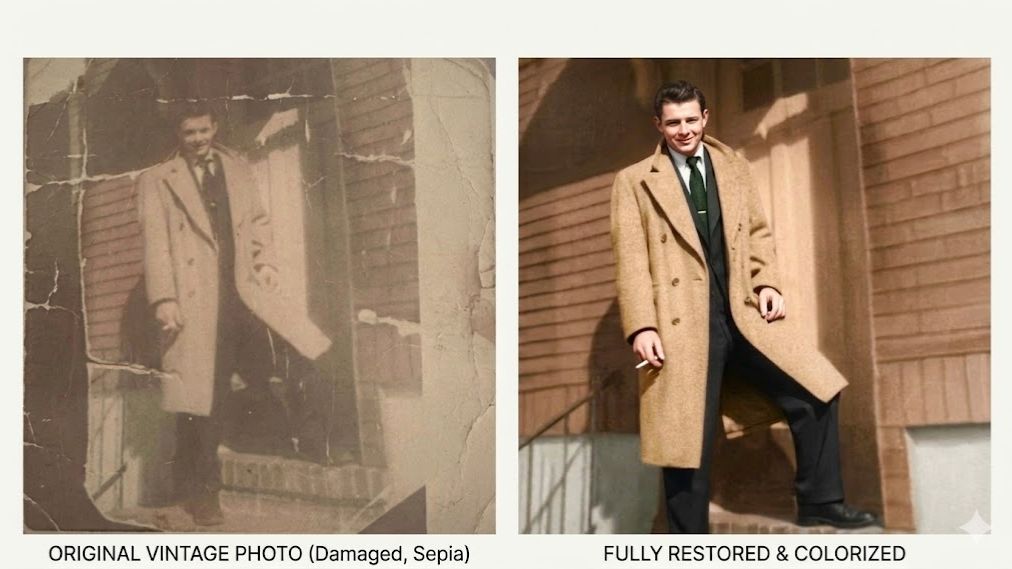
My cousin dropped a photo of her dad, my uncle, into our family group chat. That’s him, up above. He died in a car accident when she was still a baby, so she never got to know him. “He was so handsome,” she wrote. I decided to show her exactly how handsome. I ran that old photo through AI and brought it back.
You’ve got the same thing somewhere. The shoebox. The junk drawer. The album with crumbling corners. Faded faces, cracked edges, maybe the only picture you’ll ever have of a grandparent you never got to meet.
Good news: AI can fix all of it. And the best tool for the job is free.
🎞️ Gemini does the magic, free
Google’s Gemini app is the surprise star. Upload a faded, scratched, blurry photo, type one sentence, and seconds later, it hands the picture back repaired, sharpened and in believable color. No Photoshop. No skills. Best of all, it keeps faces looking like the actual person, not a stranger.
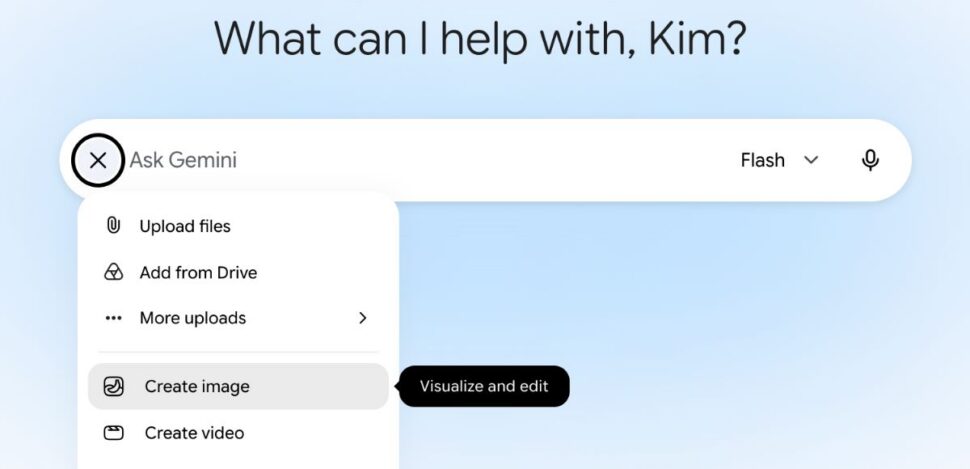
Go to gemini.google.com or the Gemini app, use the paper clip to upload your photo and select Create Image:
 Gemini
Then, paste this prompt:
Restore and colorize this photo. Repair the scratches and fading, sharpen the faces, keep everyone looking exactly the same and do not add anything new.
Want one quick fix instead? Ask plainly. “Brighten this dark photo.” “Remove the stranger in the background.” The first time it works, you might get a little misty. That’s allowed.
🤔 What about ChatGPT?
Yes, ChatGPT can restore photos. But it tends to reimagine the picture instead of repairing it, so it can change a face into someone who isn’t quite your grandmother. For family photos, where keeping the real person matters most, Gemini is the one to use.
📱 Two quick tips
Scan first. Grab the free PhotoScan by Google from the App Store or Google Play. It captures your prints without glare, and scanning in color, even for black-and-white shots, gives the AI more to work with. You can also use it to scan photos without taking them out of a photo album.
Dig out that shoebox tonight. The faces you miss are in there, waiting to come back.
📩 Send this to someone who has old family photos they keep meaning to fix.