You deleted it. Now it’s gone everywhere.
Two listeners thought they had backups. They didn’t. Here’s the difference that could save your photos, files and five years of memories.
⚡ TL;DR
- Sync and backup are not the same thing. Delete one file, and it’s gone everywhere.
- Dave lost five years of family photos. Anita wiped three devices at once. Both thought they were covered.
- An off-site backup protects you. Here’s how it works.
📖 Read time: 2 minutes
 ChatGPT/Kim Komando

Automatic cloud backup service for your photos and files. Get 60% off at Carbonite.com/Kim
May 30, 2026
“Kim, I made a huge mistake. I accidentally deleted a folder with five years of family photos. I thought I was backed up because everything was in Google Photos and synced to my laptop. When I deleted the folder on my laptop, it disappeared from Google Photos, too. All of it. Is there any way to get it back? My wife doesn’t know yet.” — Dave, Indianapolis
“Kim, I’m confused. I cleaned up my desktop and deleted a bunch of files because I figured they were safely backed up in OneDrive. Then they disappeared from my laptop, my work computer AND my phone. I thought OneDrive was a backup. Why did deleting them everywhere happen?” — Anita, San Diego
“Kim, I had over 500 files on a USB drive. The drive says it is corrupted. A local shop wants $2,100 to even try to get them. HELP!” — Chris, Austin
Three listeners wrote me this week. Different cities, different services, same gut-drop moment.
Dave from Indianapolis lost five years of family photos. He thought Google Photos had his back. Anita from San Diego cleaned up her desktop and watched files disappear from three devices at once. She thought OneDrive was her safety net. Chris from Austin has 500 files sitting on a USB drive the computer won’t read. A local shop quoted him $2,100 just to try to recover them.
All three made the same mistake. None of them had a real backup.
🔄 Sync is a mirror, not a safety net
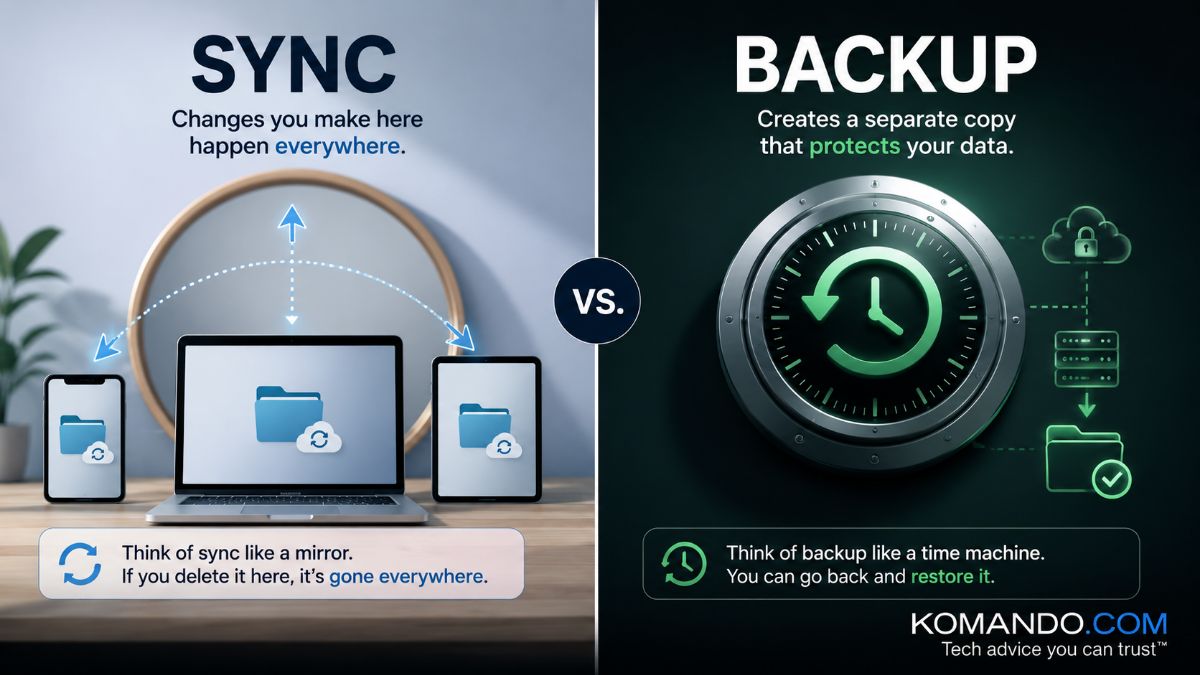
Sync does exactly what it sounds like. It keeps your files identical across every device. Delete something on your laptop? Gone on your phone. Gone on your tablet. Instantly. No warning, no “are you sure?”
That’s not a bug. That’s the feature working perfectly.
Google Photos, iCloud, OneDrive and Dropbox are sync tools. Powerful. Convenient. Not backups. Calling them backups is like calling a photocopier a file cabinet. Related. Not the same.
A real backup saves snapshots of your files. Delete something today? Your backup has yesterday’s version. Last week’s. Last month’s. It doesn’t care what you did this morning.
Dave got lucky. Google Photos keeps deleted items in a Trash folder for 60 days. He found his photos, and his wife never had to know. (Dave, you owe me one.)
Anita wasn’t lucky. Her files were gone for good. All of them.
Chris is still waiting to find out if $2,100 buys him anything at all. Good luck with that.
🔒 Here’s what protects you
You need a backup stored off-site, completely separate from your home network. That copy saves you when everything else fails. A flood. A fire. Ransomware. A USB drive that decides today is the day.
Most people set up sync, pat themselves on the back and assume they’re covered. They’re not. When USB or hard drives die, they take all your data with them. Poof. Gone. That’s usually when people get the backup religion.
This is why I use and recommend Carbonite, a sponsor of my show. It’s awesome. Let’s start with it backing up your PC or Mac automatically in the background, without you lifting a finger. Quietly. Continuously. Off-site where nothing can touch it.
When something does happen, you restore your files in a flash. If Dave, Anita and Chris had been using Carbonite, none of them would have spent a single panicked minute and lost files.
✅ Use this special link to get 50% off right now. Set it up once. Let it run. Stop betting years of memories will be OK. Carbonite is like insurance. You’ll be so glad you have it when you need it.



