🎚️ These settings make ChatGPT stop sounding like a cheerleader
October 20, 2026
By Kim Komando
ChatGPT has five settings that control how it talks to you, and most people have never opened them. Here’s the 60-second setup for work, the prompt that proves it worked and the one setting that can quietly undo all of it.
 ChatGPT/Kim Komando
What’s new: These dials have been sitting inside ChatGPT since last December, and almost nobody I know has touched them. That’s a shame, because they fix the most annoying thing about using a chatbot at work.
Ask ChatGPT whether your plan is any good, and the default answer opens with a compliment. That’s how it was tuned. And a compliment in the first line makes you read everything after it more kindly than you should. Turn the dials down, and the critique shows up first, where you’ll actually see it.
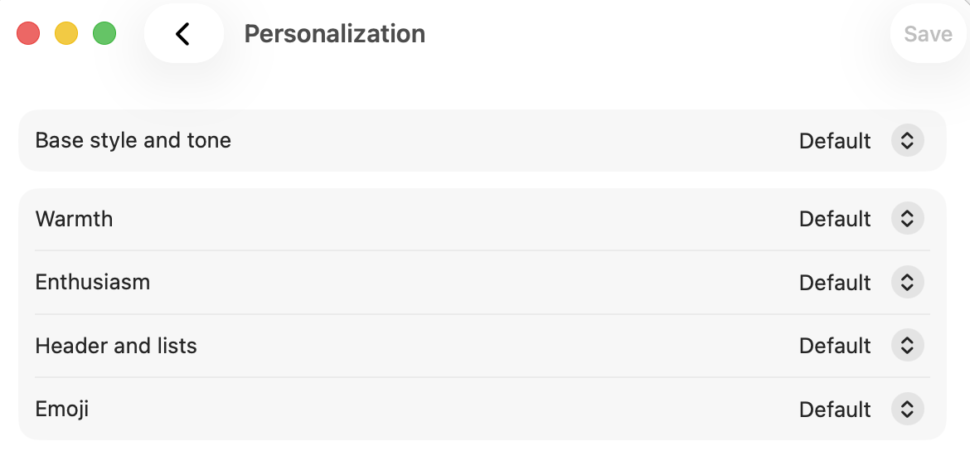
Base style and tone is ChatGPT’s overall personality. Default is clear and neutral. The other six are Professional (polished and formal), Friendly (warm and chatty), Candid (direct, honest feedback with next steps), Quirky (playful), Efficient (short and plain) and Cynical (dry and sarcastic but still useful).
Under that sit four Characteristics, each set to More, Default or Less. Warmth controls how much it sounds like it’s worried about your feelings. Enthusiasm controls the exclamation points.
Headers and lists decide whether you get paragraphs or a PowerPoint slide.
Emoji does exactly what you think.
⏱️ The 60-second setup
On web and desktop
- Profile icon > Personalization
- Next to Base style and tone, choose Candid
- Set Warmth, Enthusiasm, Headers and lists and Emoji to Less, then click Save
On iPhone and Android
- Open the sidebar > tap your profile icon > Personalization
- Under Base style and tone, choose Candid
- Under Characteristics, set all four to Less
Rather have short answers than honest ones? Pick Efficient instead of Candid. Your new base style applies to every chat, including old ones. Hate it? Flip it back to Default. Nothing breaks.
Menu labels move around between app updates, so if something looks different, start at Settings > Personalization before you go hunting through every menu like you dropped an earring down the drain.
📋 Try this prompt:
Here’s a draft. Don’t tell me what’s good about it. Give me the three weakest points in plain sentences, explain why each one would lose a skeptical reader, then rewrite only the worst paragraph. If a section is fine, skip it. Draft: [paste]
Run it once before you change the settings and once after.
⚠️ The catch: Blunter isn’t smarter. These dials change the tone, not the accuracy. A wrong answer with no emoji and no exclamation points is still a wrong answer. Check the numbers like you always would.
The setting that can undo all of it: If you set up Custom Instructions or Memory and told ChatGPT to be supportive, that can override or water down whatever personality you pick. Go to Personalization, read your Custom Instructions and delete anything like “be encouraging.” Then ask ChatGPT, “What do you remember about how I like to be spoken to?” and clear out anything soft.
Another wrinkle worth knowing: The personality shapes how ChatGPT talks to you, not what it writes for you. OpenAI says emails, résumés and posts follow your instructions instead. So your client email won’t come out sounding like a drill sergeant, but you still have to say “make it warm” when you want warm.
And “Less” emoji means fewer, not zero. In a casual chat, the occasional 👍 still sneaks through.
https://www.komando.com/tips/artificial-intelligence/%f0%9f%8e%9a%ef%b8%8f-these-settings-make-chatgpt-stop-sounding-like-a-cheerleader/